
You can have icons, checkboxes, neither or both, as decorations on the tree:

Sounds good?
You can have icons, checkboxes, neither or both, as decorations on the tree:
Sounds good?
 There are forty icons (well, one is the default, so that's 39 actually) for you to play with. The icons themselves are from the "silk icon set" from Mark James.
I replaced the regular book/page icons also with nicer-looking true color icons from the silk icon set.
So, as usual, do let me know your thoughts. Oh, and the set of icons will be fixed (at least for now), so if there are any suggestions for new icons, do let me know before v2.0!
The main feature in this release is the portable mode support. When in the portable mode, Guide will save (and load) preferences to a .ini file (that lives alongside guide.exe). To use the portable mode, either enable it from the preferences dialog:
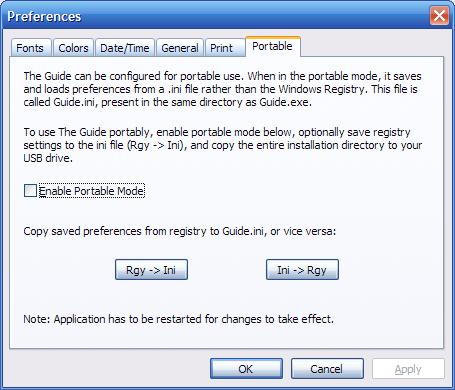
[main]
portable=0
change portable=0 to portable=1 to enable the portable mode.
There are a few other intutive improvements too -- remembering node state, the first visible line per node, search dialog improvements, better east asian language support etc.
So download, have fun, but remember this is an alpha release! Enjoy!
Links: 20dev page, download page.
You can now insert the current date or time, with a single keystroke. Ctrl+D inserts the current date and Ctrl+T the time. The keys work with the text pane as well as while editing the node text.

The format of the date and time so inserted is configurable via the preferences page:

You can override the system default formats and choose custom date/time formats, so that you can have Ctrl+D insert the string "26-Apr: " for example. Here are the dialogs where you can configure this:


The codes used here are the same as those used in the "Regional and Language Options" control panel applet.
So -- do you like it? Personally, I tend use The Guide as a journal frequently, with each node representing a day's notes. The insert date feature would be quite handy in this case.
Here are some more options, that are now configurable:

Minimizing: It is now possible to minimize The Guide using the 'X' button or the 'Esc' key. The "Use System Tray" menu entry has been moved here.
Saving: Options for:
Like them? Do let me know!
Let me also thank all of you who wrote, and keep writing, to me about what you'd like to see in The Guide. Nearly all features that appear here are the result of your mails. Keep writing!
Print and preview options in the context menu:

Select what to print in the print dialog:

Preview all options:

Export dialog also has the same options:

This is the first of the posts describing the new features in v1.6 (currently in development). Let's start with the status bar.
The old status bar had indicators for caps lock, num lock and scroll lock. Well now, these were there in the first place because of the boilerplate MFC code -- and not because it was useful in any way. Here is how it looks now:
 (click to enlarge)
There are now two elements on the status bar, one showing line/character counts/position, and the second showing the number of child nodes of the current node. The text shown in the first element varies depending on what exactly you are doing, like so:
When a node is selected: the number of lines and characters of the text in that node, and the number of child nodes are displayed. The focus must be on the node, like when you've just clicked on it.

When you're editing the text: the current location as a line and character offset. The total number of lines are also displayed. Characters start from 1 for each line.

When text is selected: the number of lines and characters of the selected text is displayed.

When there are no children for a node, the child count area shows "(no children)" and when there is no text, the position area shows "(no text)".
Like it? No? Just leave a comment right here!
